Let workflows do the repetitive part. Recruiters do the rest.
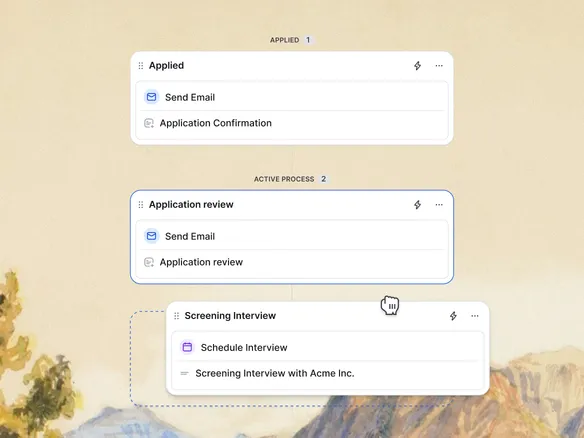
A visual no-code editor: trigger emails, tag candidates, and move them between stages automatically when they enter a new stage or answer a screening question. Branch by score, location, department, or language inside a single workflow. Recruiters get back to the conversations that actually decide a hire.
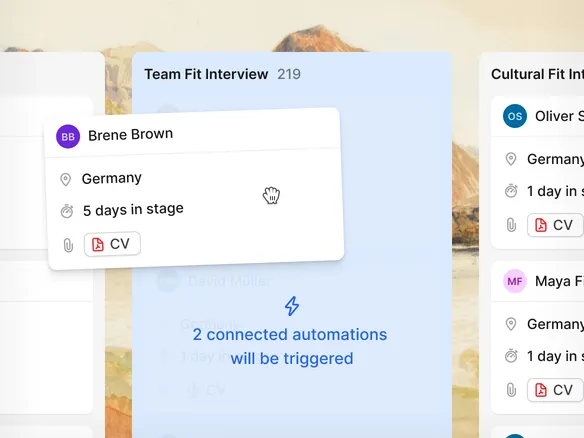
When a candidate moves to 'screening', send the take-home brief. When they move to 'rejected', send the templated rejection. The email goes out automatically with your merge fields filled in. Build it in the visual editor: pick a trigger, pick an action, no scripting.
Automated emails fire the moment a candidate changes stage
Merge fields pre-filled from the candidate record
Build once in the visual editor — no scripting required
02
Tag and route from the application form.
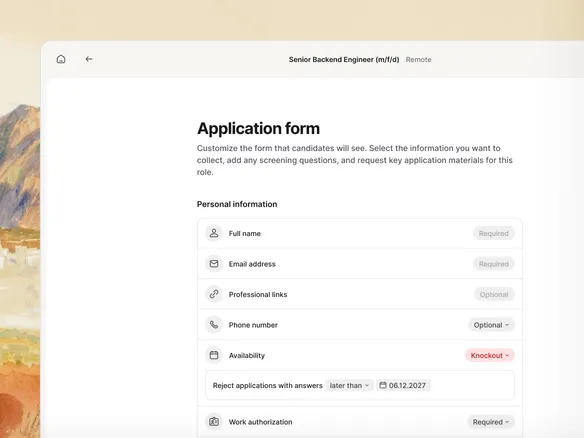
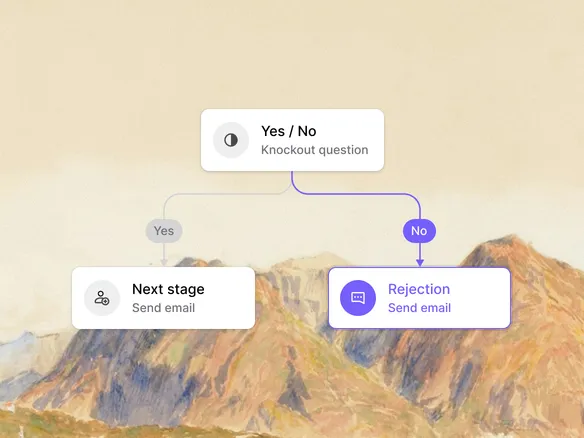
Every applicant carries the board they came in on, and Join can auto-tag them by source for reporting. Application-form screening questions can drive tags too: candidates who passed the knockouts go one way, ones who didn't go another. Or trigger workflows manually from a candidate profile when you need a one-off.
Auto-tag candidates by the board they applied through
Knockout answers drive tags and routing automatically
Trigger workflows manually from the profile for one-offs
03
Branch on what matters.
Conditional logic in the visual editor: route by score, location, department, or language. Senior London engineers can flow into one workflow; junior Berlin retail into another. Different actions for different segments, without building a separate workflow per segment.
Route by score, location, department, or language
Different actions for different segments in one workflow
No need to build a separate workflow per candidate segment
WHAT YOU CAN DO
Automate without giving up control.
Four triggers
Stage move, source board, application form answer, or a manual button on the candidate profile. Pick one to start a workflow.
Three actions
Send a templated email, change the candidate's stage, or add a tag. Chain them in any order.
Conditional branching
Route by score, location, department, or language. Different actions for different segments, in one workflow.
Slack via Zapier or Make
Need to notify a teammate on Slack or post to your HRIS? Wire Join's events into your Zap or Make scenario via the Integrations feature.
Recruitment automation FAQ
What can I automate in Join?
Workflows fire on four triggers: a stage move, the source board an applicant came in on, an application-form answer (e.g., a knockout question), or a manual click on the candidate profile. The workflow then sends a templated email, changes the candidate's stage, or adds a tag, with optional conditional branching. If you can express it as 'when X happens, send this email, move to that stage, tag this way', Join runs it.
Do I need a developer to set up recruitment automation?
No. Workflows are built in a visual editor: pick a trigger, add actions, set conditions. No code.
How does conditional branching work?
Inside a workflow, you can route candidates differently based on their score, location, department, or language. One workflow can handle multiple paths instead of forcing you to build a separate workflow per segment.
Can I push automation events to Slack, Teams, or my HRIS?
Not as a native action today. Use the Integrations feature: Join's events feed into Zapier or Make scenarios, which can then post to Slack, Microsoft Teams, your HRIS, or any other tool with a Zapier/Make integration.
How does recruitment automation relate to the hiring pipeline?
Workflows fire on pipeline events: a stage move is the most common trigger. The pipeline is the structure; workflows are what happens automatically as candidates move through it.